So after almost exactly a year, my android app has reached a pretty big milestone. Note that it wasn’t a year of effort..not even close.. I didn’t touch it for about 4 months.. and even when I am actively coding, I’m lucky to get a couple hours (between 9pm and midnight) where I don’t get interrupted..
Anyway, the milestone reached is that I have all communications built. I still have lots of features to add, and lots of functionality in the app itself..and a TON of making it look good.. but I think the main complexities are taken care of now.
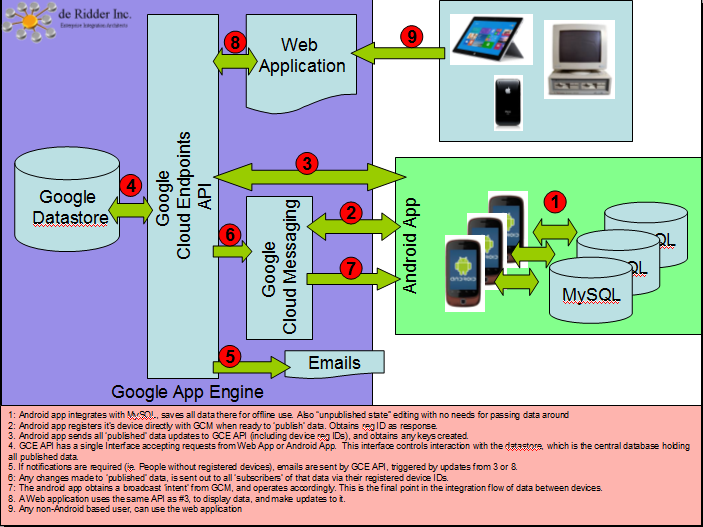
I recall when I first started, I was trying to find a good high level architecture of how an android application would work, together with GAE (Google App Engine), GCM (Google Cloud Messaging), GCE (Google Cloud Endpoints), the Google Datastore, and the MySQL database. I drew a few versions of the architecture early on, after some reading (being an enterprise architect, I like understanding the big picture before I dive in), and it turns out they were pretty accurate. But I’ve now drawn the pic, in case anyone else looking happens to find this little pic in the interwebs..
Of course there are many ways to skin this.. but this might be a pretty good general way, assuming you want offline data, but also want to share data between other devices and at the same time minimize the traffic since using Google’s platform is only free if you stay below certain quotas.
So here is the pic. It turns out that to code an app that does this, really means you are coding about 3 different applications. The Android App itself, the GCE API, and the Web App if you want users who aren’t on Android.